
Download TapiRex – landline caller ID, caller ID for computer, call identification, system tray notifications, database integration, TapiRex app
Overview
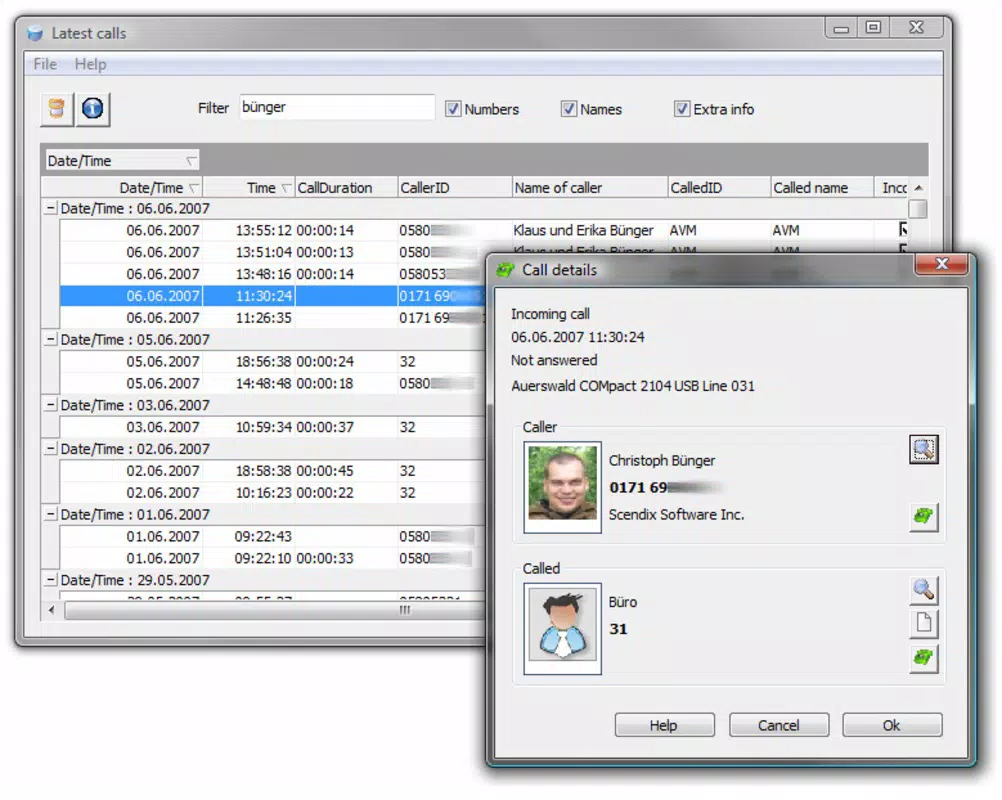
TapiRex is a specialized productivity tool designed to enhance the functionality of landline telephones by delivering real-time caller identification directly to a user’s computer. The application enables users to view incoming call details without having to physically answer the phone, making it ideal for individuals who are frequently occupied with computer-based tasks. By connecting the landline to a PC via a compatible telephone adapter, TapiRex leverages the system’s capabilities to display caller information in the computer’s system tray, ensuring users remain informed without disruption.
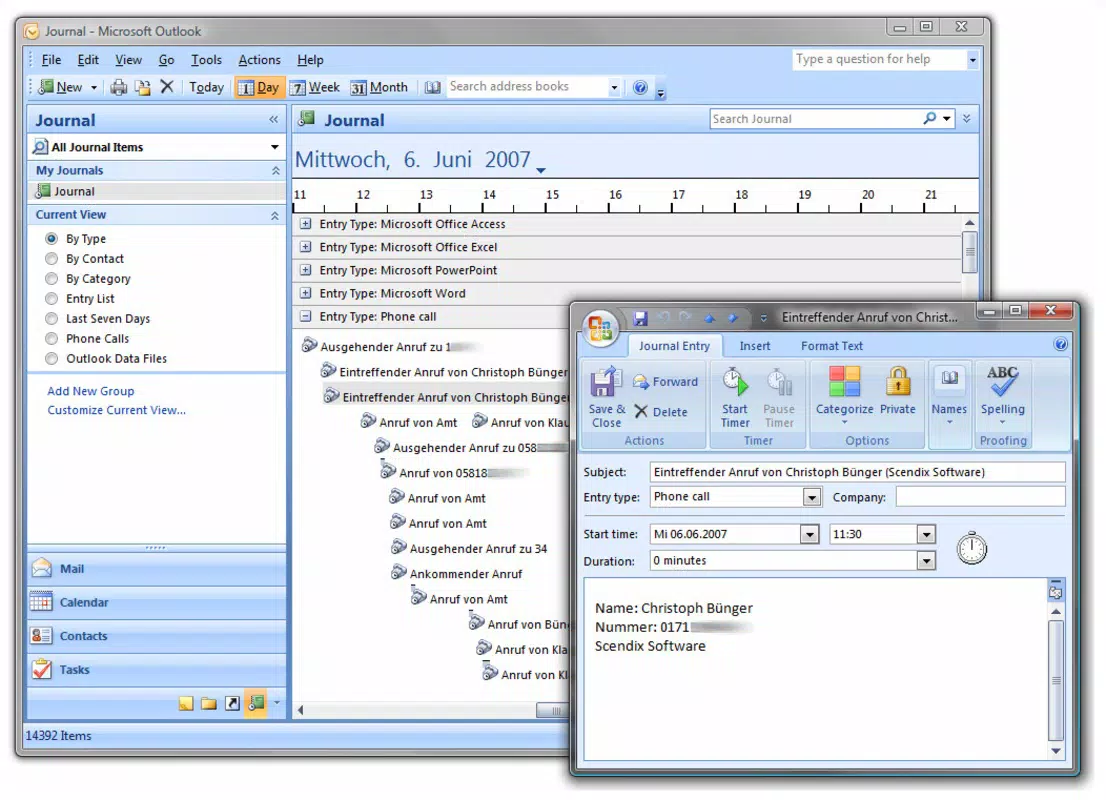
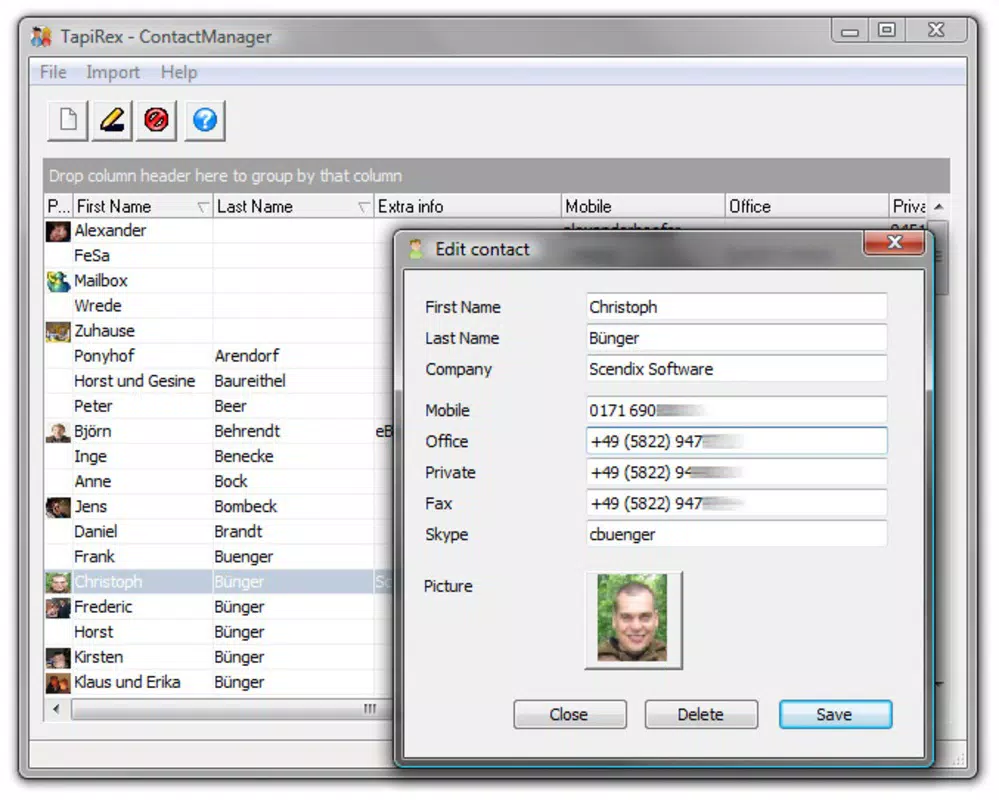
Designed primarily for office environments and home users with landline phones, TapiRex helps streamline communication by allowing users to prioritize calls based on caller identity. This is especially useful in professional settings where timely responses to important contacts are critical. The app also supports integration with external databases such as Microsoft Outlook, Access, and MySQL, enabling users to access enriched caller profiles, including contact history and notes.
Since its release in November 2014, TapiRex has served as a niche but effective solution for users seeking improved landline management. While not a mobile application in the traditional sense, its role in bridging landline communication with digital workflows underscores its relevance in hybrid work environments. The developer, TapiRex, has focused on delivering a stable, no-frills utility that fulfills a specific need within the broader productivity ecosystem.
Key Features & Functionality
- Caller Identification: Automatically detects incoming landline calls and displays the caller’s name and number on the computer screen, even before the phone is answered.
- System Tray Notifications: Displays call alerts in the system tray, ensuring visibility without interrupting active workflows or requiring constant screen monitoring.
- Database Integration: Connects with Microsoft Outlook and other databases like Access and MySQL to pull detailed contact information, enabling richer caller profiles.
- User-Friendly Interface: Features a clean, minimal design that requires no technical expertise, allowing users to set up and use the app with ease.
- Seamless Workflow Integration: Operates in the background, minimizing resource usage while maintaining real-time call monitoring and notification delivery.
For example, a receptionist managing multiple tasks can quickly assess whether an incoming call is from a client, vendor, or internal team member and decide whether to answer immediately or delegate. Similarly, a remote worker using a landline for business calls can stay informed about incoming communications without leaving their desk. The integration with Outlook allows for quick access to past interactions, reducing response time and improving professionalism.
Interface, UX & Performance
TapiRex presents a lightweight and straightforward interface that prioritizes functionality over visual flair. The main display is minimal, focusing on essential caller details such as name, number, and timestamp. All interactions are managed through the system tray, reducing screen clutter and maintaining focus on primary tasks.
Navigating the app is intuitive, with a simple setup process that guides users through connecting the landline to the computer and configuring database links. The application runs efficiently in the background, consuming minimal system resources. Although the developer did not list formal performance metrics, user reports indicate stable operation across various Windows configurations.
Responsiveness is consistent, with caller data appearing almost instantly upon connection. The app maintains stability during prolonged use, with no reported crashes or memory leaks in available user feedback. However, specific requirements for different device categories were not listed, and compatibility with newer Windows versions has not been officially confirmed.
Platform Compatibility & Technical Requirements
TapiRex is designed for the Windows platform and requires a compatible landline telephone adapter to function. The current version is 2.1.3.0, with a file size of 12.5 MB, making it a lightweight download suitable for systems with limited storage.
The developer did not specify minimum OS requirements or hardware prerequisites. As such, compatibility with modern Windows versions (e.g., Windows 10 or 11) cannot be confirmed without further testing. Users should verify that their system supports the necessary TAPI (Telephony Application Programming Interface) components, which are essential for call detection and data transmission.
While the app is not available on mobile platforms, its desktop-centric design aligns with its purpose of integrating landline calls with computer workflows. The absence of mobile availability is expected given the app’s reliance on desktop hardware and telephony interfaces.
Pros and Cons
Pros
- Delivers real-time caller ID on the computer without answering the phone.
- Minimal system resource usage and background operation.
- Integrates with Microsoft Outlook and other databases for enhanced contact details.
- Simple, intuitive interface suitable for non-technical users.
- System tray notifications ensure visibility without distraction.
Cons
- Not available for mobile platforms (Android or iOS).
- Compatibility with newer Windows versions not officially confirmed.
- Requires a landline and compatible telephone adapter to function.
- Developer did not provide detailed technical specifications or system requirements.
- Price point of $14.95 may be considered high for a niche utility.
FAQ
Is TapiRex compatible with Windows 11?
The developer did not confirm compatibility with Windows 11. Users are advised to test the application on their system before purchasing.
Can I use TapiRex with my mobile phone?
No, TapiRex is designed for landline telephones and requires a computer-connected telephone adapter. It is not compatible with mobile phones or VoIP services.
Does TapiRex require an internet connection?
Not for basic caller ID functionality. However, database integration may require network access if the contact data is stored remotely.
How do I install TapiRex on my computer?
Download the installer from the official source, run the file, and follow the on-screen instructions. Ensure your landline is connected to a compatible adapter.
Is TapiRex secure?
While the app does not transmit call data over the internet by default, users should ensure their system is protected with up-to-date antivirus software and firewall settings.
Final Thoughts
TapiRex remains a uniquely valuable tool for users who rely on landline telephones and want to modernize their call management experience. Its ability to deliver caller ID directly to the computer, combined with database integration, makes it a powerful asset in both professional and personal settings. While its age and lack of mobile support are limitations, its core functionality remains effective for those who need it.
For office administrators, remote workers, and anyone managing high volumes of landline calls, TapiRex offers a practical, no-frills solution that enhances productivity without complexity. The app’s low file size and straightforward design further support its efficiency.
Download TapiRex now


